What makes a good photo for a printed golf ball
A golf ball has a small, curved print area. This guide explains how framing, lighting, and subject size can affect the preview and the finished print.

Photo choice has a noticeable effect on the finished design. A close, well-lit subject is generally easier to see on a small, curved print area than a distant or dark subject.
Start with a clear image in which the main subject fills a large part of the frame. Use the on-screen preview to check the crop and visible detail before ordering.
One thing up front. Photo quality matters on a small surface. Check your preview carefully; small or blurry photos may print softly. If you are unsure, contact us before ordering. These tips can help you compare your options.
The short version
Short on time? This is the whole article in five lines.
- Make the main subject easy to see. A close crop generally shows more usable detail in the preview.
- Use even lighting. Photos with visible facial detail generally preview more clearly than dark or backlit images.
- Check the background. Use the available background tools if you prefer a simpler design, and review the result before ordering.
- Watch subject size in group photos. More people usually means each face appears smaller in the printable area.
- Keep text concise. Shorter text is generally easier to read in the preview.
Start with a clear subject
Photos taken from farther away can leave the main subject very small after cropping. Choose an image where the person, pet, or object already occupies a large part of the frame.
Cropping can remove surrounding space, but it cannot add detail that was not captured in the original image. Compare the available photos in the preview before deciding.
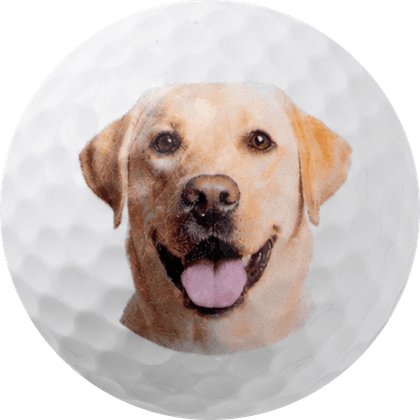

Lighting and visible detail
Even lighting can make facial features and other details easier to see in the preview. Dark or strongly backlit images may show less detail after cropping. If possible, choose a photo taken outdoors or near a window and review the preview at the size shown.
Check the background
A busy background can compete with the main subject in a small print area. The customizer includes background options you can try. Review the processed image carefully, especially around hair, glasses, hats, and multiple people.
How different photos may appear
Use this as general guidance and rely on your preview for the specific image.
| Photo | What to check | Why |
|---|---|---|
| Close-up of one face | Often easier | The subject uses more of the available print area. |
| Pet, head and shoulders | Often easier | Check that the face is visible and fills much of the preview. |
| Two people, close together | Review carefully | Both faces need to remain large enough to see after cropping. |
| Baby or toddler | Review carefully | Check facial detail and lighting at preview size. |
| Full-body or standing shot | May lose detail | Cropping the full scene can leave the face small. |
| Group of four or more | May lose detail | Each person may appear small in the printable area. |
| Screenshot of a photo | Original preferred | An original file may preserve more detail than a screenshot. |
If you are comparing several images, preview each one and contact us before ordering if you have a question.

A simple way to compare photos
If you are choosing between several photos, compare them in this order.
Start with subject size. Look for an image where the person, pet, or object occupies a large part of the frame.
Then check the lighting. Look for visible facial detail without heavy shadow or backlighting.
Then check the background. A simpler background may keep more attention on the subject; you can also try the background options in the customizer.
Then check the preview. Review the crop, image edges, and text at the displayed size. Contact us before ordering if you have a question.
What to put on the back
You can place a photo on one side and text on the other. Shorter text generally appears larger and is easier to review in the preview. Try a name, date, nickname, or short message and adjust it before ordering.
Use wording that fits the recipient and review spelling, line breaks, and placement in the preview.
Bottom line. Start with a clear photo and check the preview carefully. If you are unsure about the result, contact us before ordering.
Photo and text design ideas
A photo, name, date, caption, logo, or monogram can each create a different look. Choose the combination that fits the recipient and the occasion.
The customizer lets you compare the photo and text together before ordering. Keep the subject and lettering inside the displayed print guides and review both sides of the design.
Frequently asked
Does my photo need to be high resolution?
It depends on the crop and the source image. A clear original file with the subject filling much of the frame is preferable. Check the preview and avoid screenshots when the original is available.
Can you remove the background for me?
The customizer includes background options. Review the processed image carefully before ordering because fine details and multiple subjects can affect the result.
Can I use a photo of someone who has passed away?
You may use a photo you have the right to use. For older or scanned images, choose the clearest original available and review the preview before ordering.
What if I pick the wrong photo?
Contact us immediately. If production has not started, we may be able to update the order. Changes may not be possible after production begins.
Do you publish performance testing?
We have not published independent performance testing comparing printed and unprinted balls. These are personalized golf balls, and appearance and play characteristics can vary by ball and use.
Key takeaways
- Make the main subject large in the frame. Cropping cannot add detail that was not captured in the original image.
- Check lighting and visible detail. Dark or backlit images may show less detail in the preview.
- Try the available background options if you want a simpler design, then review the processed image.
- Keep the back text concise. Shorter text is generally easier to review.
- Check the preview before you order, especially the crop and any small text. Contact us if you are unsure.

Written by Enrick Bui of Custom Golf Balls Now in Gilroy, California. More about us.